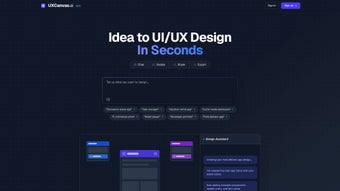

Download UXCanvas AI – Free AI-Powered Design Tool for Web Apps (Windows, Mac, iOS, Android)
UXCanvas AI is a cutting-edge, subscription-based web application designed by Mike Tromba to revolutionize the way designers and developers create user interfaces. As part of the growing AI design category, UXCanvas AI leverages artificial intelligence to streamline the entire UX/UI workflow—from concept ideation to high-fidelity prototyping. This cloud-based tool runs directly in your browser, making it accessible from any device with an internet connection, including Windows, Mac, iOS, and Android.
No installation is required, offering a seamless experience across platforms. Whether you're a freelance designer, a startup founder, or part of a product team, UXCanvas AI helps you generate wireframes, layouts, and interactive prototypes in seconds. With intuitive AI-driven suggestions, real-time collaboration, and a clean, modern interface, this tool is ideal for fast-paced digital product development.
While Softonic hasn’t yet tested the app, early adopters have praised its speed and innovation. Try UXCanvas AI today and see how AI can elevate your design process—no downloads, no delays, just powerful results.
AI-Powered Design Made Simple: How UXCanvas AI Transforms Workflow
UXCanvas AI stands out in the crowded field of design tools by integrating artificial intelligence directly into the creative process. Unlike traditional tools that require manual layout building and repetitive adjustments, UXCanvas AI uses AI to interpret your design intent and generate smart, responsive UI components in real time. Whether you're sketching a mobile app screen, designing a dashboard, or prototyping a SaaS interface, the tool understands context and offers intelligent suggestions based on industry standards and user behavior patterns.
For example, typing a simple prompt like “Create a login screen with dark mode and animated transitions” triggers the AI to generate a fully styled, interactive prototype within seconds. This capability drastically reduces the time spent on low-level design tasks, allowing teams to focus on strategy, usability, and innovation. The AI also learns from user preferences over time, adapting to your style and workflow—making it smarter with every project.
With features like auto-layout alignment, component library integration, and responsive breakpoints, UXCanvas AI ensures your designs are not only beautiful but also functional across devices. What truly sets it apart is its collaborative nature: multiple team members can work on the same canvas simultaneously, with AI providing live feedback on accessibility, color contrast, and design consistency. This real-time intelligence helps prevent common UX pitfalls before they become costly mistakes.
The tool also supports version history and change tracking, so you can always revert to earlier iterations. For designers who value speed, precision, and creativity, UXCanvas AI isn’t just a tool—it’s a design partner.
Seamless Cross-Platform Access & Easy Setup for All Users
One of the most compelling aspects of UXCanvas AI is its accessibility. As a fully web-based application, it runs on any modern browser—Chrome, Safari, Firefox, Opera, and even Internet Explorer (though we recommend using a more updated browser for optimal performance). This means you can start designing from your desktop, tablet, or smartphone without needing to download or install any software.
Simply visit https://uxcanvas.ai, sign up for a free trial, and begin creating your first prototype in under a minute. The setup process is intuitive, with onboarding tutorials and interactive tooltips guiding new users through the interface. Once logged in, your projects are automatically saved to the cloud, so you can switch between devices and pick up right where you left off.
This is especially beneficial for remote teams or freelancers who work across multiple locations. UXCanvas AI supports real-time collaboration, allowing team members to comment, suggest changes, and view updates instantly. The platform also integrates with popular tools like Figma, Notion, and Slack, enabling smooth handoffs between design and development.
For developers, the tool exports clean, production-ready code snippets in HTML, CSS, and JavaScript, reducing the need for manual translation. Updates are rolled out seamlessly in the background—no forced restarts or complex update procedures. This ensures you always have access to the latest features, security patches, and performance improvements.
Whether you're using a Windows PC, Mac laptop, iPad, or Android tablet, UXCanvas AI delivers a consistent, high-performance experience. The responsive interface adjusts dynamically to your screen size, preserving usability and visual fidelity. With no installation hassle and instant access, UXCanvas AI is the ultimate choice for agile, mobile-first design teams.
Key Features, Pros, and Cons of UXCanvas AI
- AI-Powered Prototyping: Generate wireframes and interactive prototypes from natural language prompts.
- Real-Time Collaboration: Work with team members simultaneously with live editing and commenting.
- Responsive Design Engine: Automatically adjusts layouts for desktop, tablet, and mobile devices.
- Component Library & Reusability: Access pre-built UI components and create custom reusable elements.
- Code Export: Export clean, semantic HTML/CSS/JS code directly from your designs.
- Version Control & History: Track changes and revert to previous project states effortlessly.
- Accessibility Checker: AI-driven feedback on color contrast, font size, and screen reader compatibility.
Pros
- Fast, AI-driven design generation saves hours of manual work.
- Cloud-based—no installation, works on any device with a browser.
- Intuitive interface ideal for both beginners and experienced designers.
- Real-time collaboration enhances team productivity.
- Regular updates with new AI features and performance improvements.
Cons
- Subscription model may be costly for individual freelancers on a tight budget.
- Relies on stable internet connection for full functionality.
- Advanced AI features may require a learning curve for new users.
- Limited offline capabilities due to cloud-first architecture.
Frequently Asked Questions (FAQ)
Is UXCanvas AI free to use?
UXCanvas AI offers a free trial with limited features. After the trial, you’ll need to subscribe to access full AI capabilities, real-time collaboration, and advanced export options. The subscription model ensures continuous updates and premium support.
Can I use UXCanvas AI on my iPhone or Android device?
Yes, UXCanvas AI is a web application that works on iOS and Android devices via any modern browser. You can access your projects and design on the go, though full functionality is best experienced on larger screens.
Does UXCanvas AI support team collaboration?
Absolutely. UXCanvas AI includes real-time collaboration features, allowing multiple users to work on the same project simultaneously. You can leave comments, assign tasks, and track changes in real time.
Can I export my designs as code?
Yes, UXCanvas AI can export clean, production-ready HTML, CSS, and JavaScript code directly from your designs, making it easier for developers to implement your UI without rework.
What operating systems are supported?
UXCanvas AI is browser-based, so it works on Windows, Mac, iOS, and Android. No native app is required—just a stable internet connection and a modern web browser.
Final Verdict: UXCanvas AI Is a Game-Changer for Modern Design Teams
UXCanvas AI is more than just another design tool—it’s a leap forward in how we approach user experience creation. By combining the power of artificial intelligence with a clean, intuitive interface and robust collaboration features, it empowers designers and developers to work faster, smarter, and more creatively. While the subscription model may not suit every budget, the value it delivers in time savings, consistency, and innovation is hard to match.
The fact that it runs entirely in the browser, supports all major platforms, and continuously improves through updates makes it a future-proof choice. Whether you're prototyping a new app idea or refining a complex dashboard, UXCanvas AI handles it all with ease. If you're serious about modern, AI-driven design, this is the tool you need.
Don’t wait—download UXCanvas AI today and experience the future of web app design.
CTA: Start your free trial now at UXCanvas.ai and transform your design workflow with AI.



.png)



